DJI OM 5 Setup
DJI OM 5 Setup
If you are new to DJI gimbals, the first thing you need to do is install the DJI Mimo app onto your smartphone. And if you are coming from the DJI OM 4 or other devices, you might want to delete and reinstall the Mimo app to make sure you have version 1.6.
Next, unfold the gimbal. You need to swivel the top around 180 degrees first, as this locks the gimbal in place. Make sure it doesn’t slip back as you are trying to unfold it. It unfolds on this silver hinge so just be careful not to pull it in the wrong way and do something nasty to your gimbal.
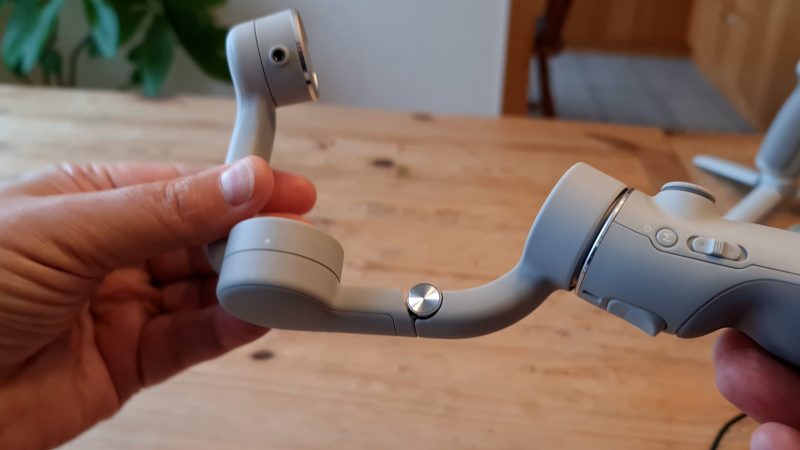
The hinge is on a spring, so once it’s open it locks into place without you needing to do anything.
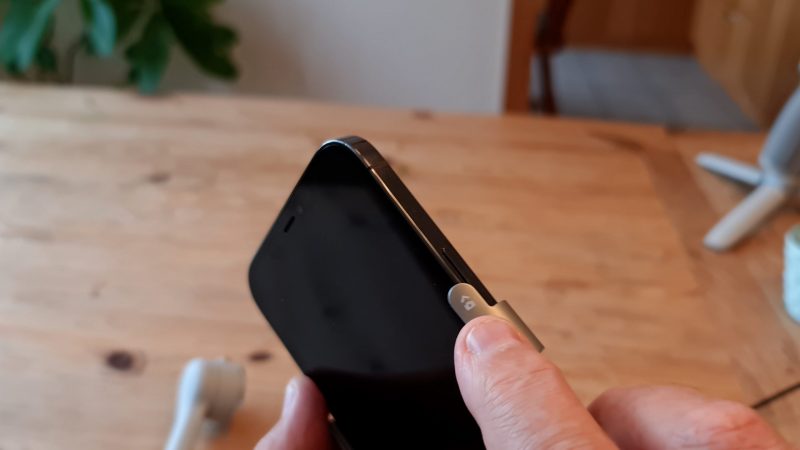
At this point, you might find it easier to screw the mini tripod base into place. It just makes it easier to mount the phone this way. Now take the magnetic clamp and slip it over your smartphone.
Make sure the camera symbol is on the top of the phone and your phone’s camera is placed on the left – follow the arrow. The clamp should snap into place, but you need to align the notch on the gimbal with the opposite part of the “jigsaw”. There’s a small white dot on both to let you know you have it in the right place.
Next step is to power on the gimbal. Like the DJI OM 4, it always boots up with the phone in portrait orientation. Now boot up the Mimo app and follow instructions to connect the gimbal. It should show you a message saying the gimbal has been found, so just tap “connect”.
If it connects successfully, at this point you’re basically ready to get shooting with your gimbal.
https://momofilmfest.com/


Comments
Post a Comment